
Deploy status
GitHub repositories only, on the turbo-github backend.
Saving tells an editor their change was committed, not that the site has rebuilt. Deploy status closes that gap: when a deploy containing their change succeeds, the CMS tells them.
Your change to “Spring menu” is live · View entry
It’s asynchronous — the save toast goes away, the editor carries on, the notification arrives on its own. Where a collection sets a preview_path the link opens that entry’s page; one deploy carrying several changes produces one “3 changes are live”.
The Deploys page
A Deploys item at the end of the CMS header shows current state — grey at rest, amber while a save is publishing, red after a failure — and opens a page that refreshes itself while open.
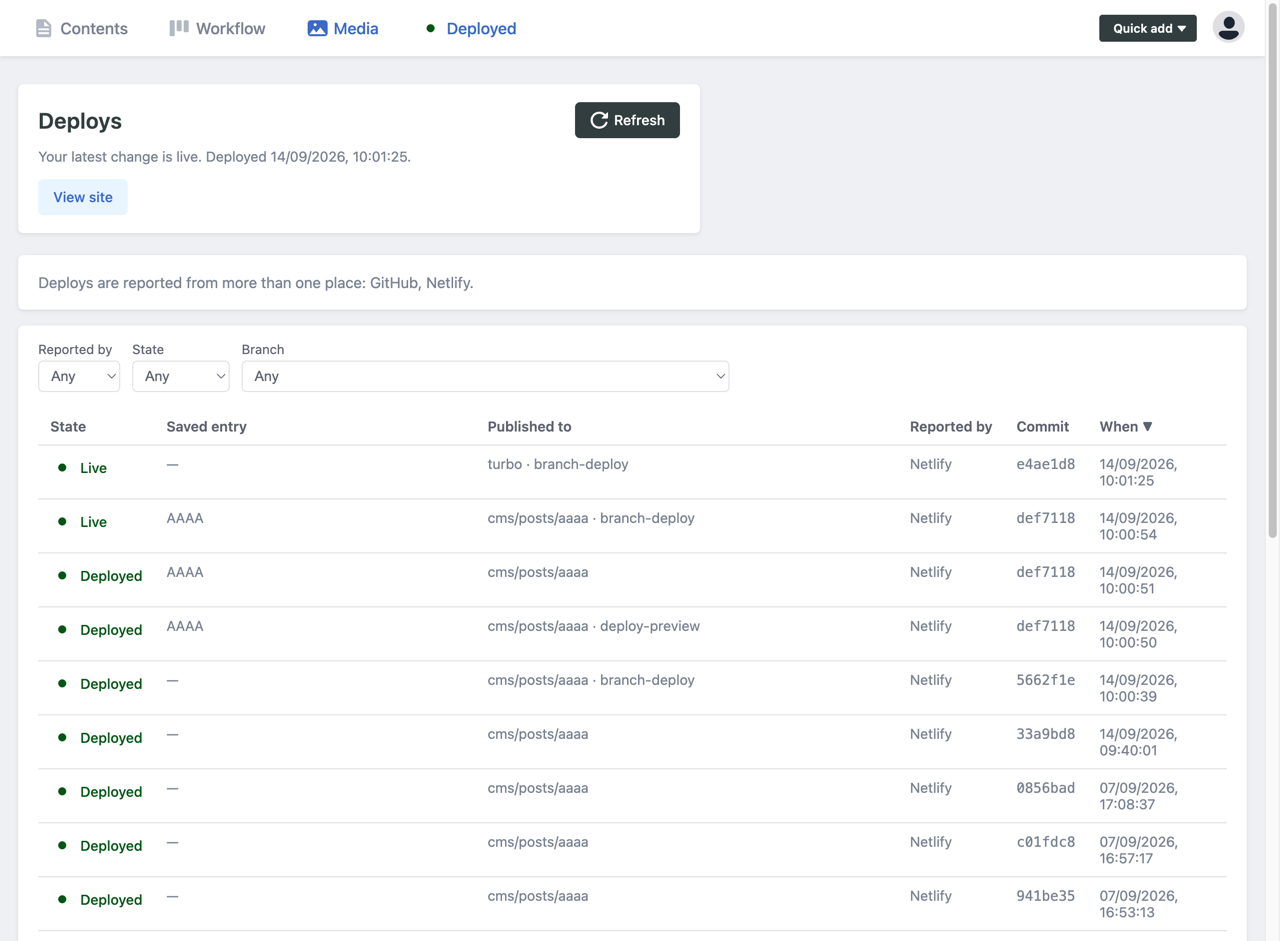
The band at the top answers “is my change live”, and speaks only for the branch your site publishes from.
Each row names the saved entry and where the deploy published to — the branch, plus the host’s environment when it sends one (main · production, cms/posts/spring-menu · deploy-preview). Commit ids link to your Git host; the state links to the site on success, the build log on failure. A dash in the entry column means either a commit that didn’t come from the CMS, or a build that batched several commits.
Live marks each branch’s newest success — what that branch’s URL is currently serving. Earlier successes on the same branch read Deployed. With editorial workflow you’ll see several Live rows, one per cms/… branch, because each has its own preview URL; only the one on your publishing branch is the published site.
Filter by reported-by, state or branch, sort any column, and page through the most recent 200 deploys at 20, 50 or 100 a time. Older than that, use your host’s dashboard.
Unknown replaces a build still marked running half an hour after anything last mentioned it. Usually a deploy preview whose branch was deleted mid-build — merging an editorial-workflow entry removes its cms/… branch, and some hosts then abandon the build silently. The published deploy is unaffected.
“Nothing has been reported since your change of…” means half an hour has passed since a save with nothing reported at all, so the page stops claiming anything rather than leaving an old success marked Live. It isn’t proof of a problem, but a build failing before the step that reports the deploy is the usual cause — see reporting failures.
Does your host need setting up?
Depends on whether it reports deploys to GitHub. Most do.
| Host | |
|---|---|
| Vercel | Nothing |
| Cloudflare Pages | Nothing |
| GitHub Pages | Nothing |
| GitHub Actions building the site itself | Report failures |
| Netlify | Add the webhook |
| Anything else | Add the webhook |
For the “nothing” hosts the Decap GitHub App already listens for deployment_status, check_run, status and page_build. Two caveats: Vercel’s deployment_status webhook can be switched off, in which case use the webhook instead; and Cloudflare Pages doesn’t report builds it skips.
Editorial workflow
Deploys of cms/… branches are recorded and shown with their branch and environment, so you can see whether an entry in review has a working preview.
They never produce a notification and never feed the band at the top of the page. “Your change is live” is a claim about the published site, and an entry in review hasn’t been published — for that, use deploy preview links.
Cancelled and superseded builds
A build cancelled in favour of a newer commit hasn’t lost the change; it ships in the newer build. Turbo treats it as superseded, keeps waiting, and notifies when a deploy containing the commit succeeds.
That’s the general rule — the question is “has a deploy containing my commit succeeded”, not “did the deploy of my exact commit succeed” — and it’s what makes several editors saving at once, one editor saving repeatedly, and hosts that batch commits all resolve correctly. Builds skipped for no content change or [skip ci] are treated the same way, even where Netlify reports them as errors.
Configuration
Deploy status hides itself on sites where nothing has ever been reported. To turn it off explicitly:
backend:
  name: turbo-github
  turbo_site_id: your-site-id
  deploy_status: false
Or one surface at a time:
backend:
  deploy_status:
    notifications: false # no "your change is live" toasts
    page: false          # no Deploys nav item or page
If the repo deploys to several places, each is listed separately and the notification names the host — “live on Netlify”. Name one to be the only one that notifies:
backend:
  deploy_status:
    primary_target: Cloudflare Pages
Use the name shown in the Reported by column.
Nothing arrives
- Open the Deploys page. Nothing recorded means your host isn’t reporting — expected on Netlify until you add the webhook.
- Successes there but no failures? If the newest row is an old success and your site builds in GitHub Actions, the build is failing before the step that reports it. This is the one case where the page is confidently wrong rather than empty.
- Check the branch. Only the branch the site publishes from is recorded.
- Check the GitHub App. An installation predating deploy status needs its new read permissions approved by an org owner.
- Rotated the secret? The old one stops working immediately. On Netlify, update all three notifications.
- Deploy previews only? Those are deliberately ignored here — use deploy preview links instead.