Product features

Everything Decap CMS and Decap Turbo can do today, and what is on the roadmap. Pick a role to see only the features that matter to you.

Friendly editor UI with real-time preview

Decap CMS
Decap provides a web editor with structured fields, rich text, and live preview so non-technical contributors can work confidently.
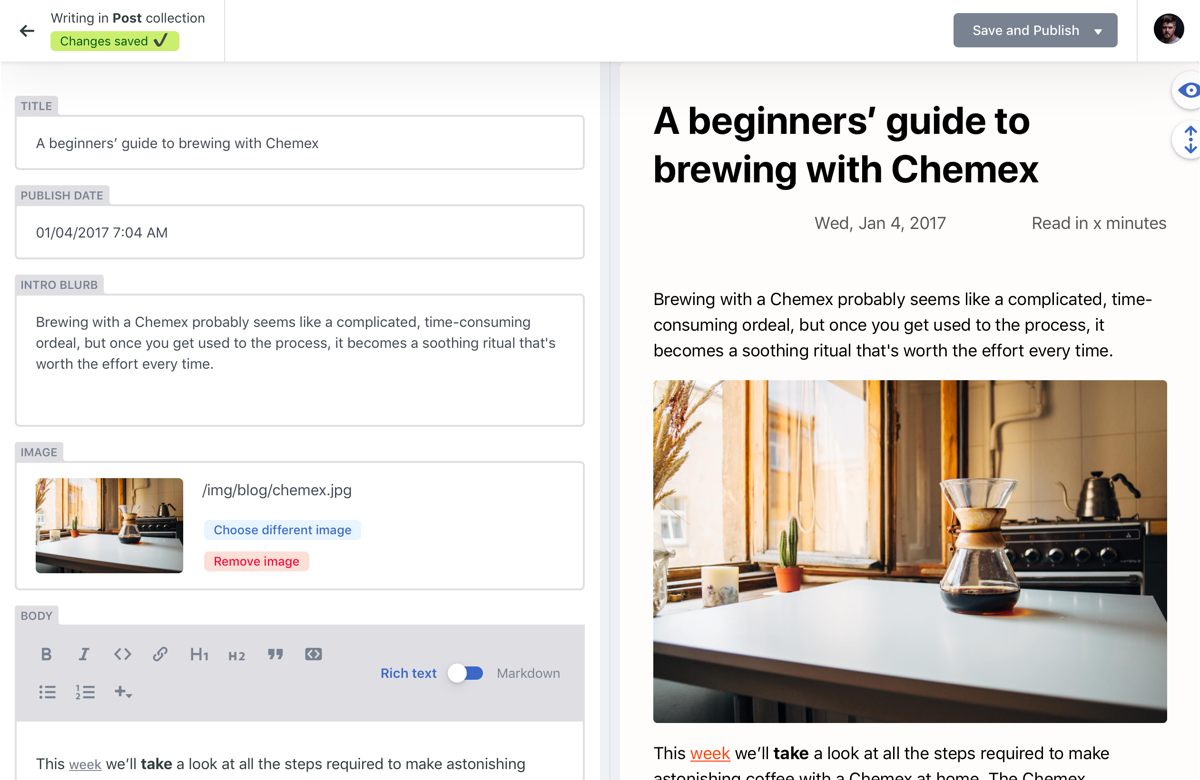
Decap editor with live preview

Editorial workflow for draft, review, and publish

Decap CMS
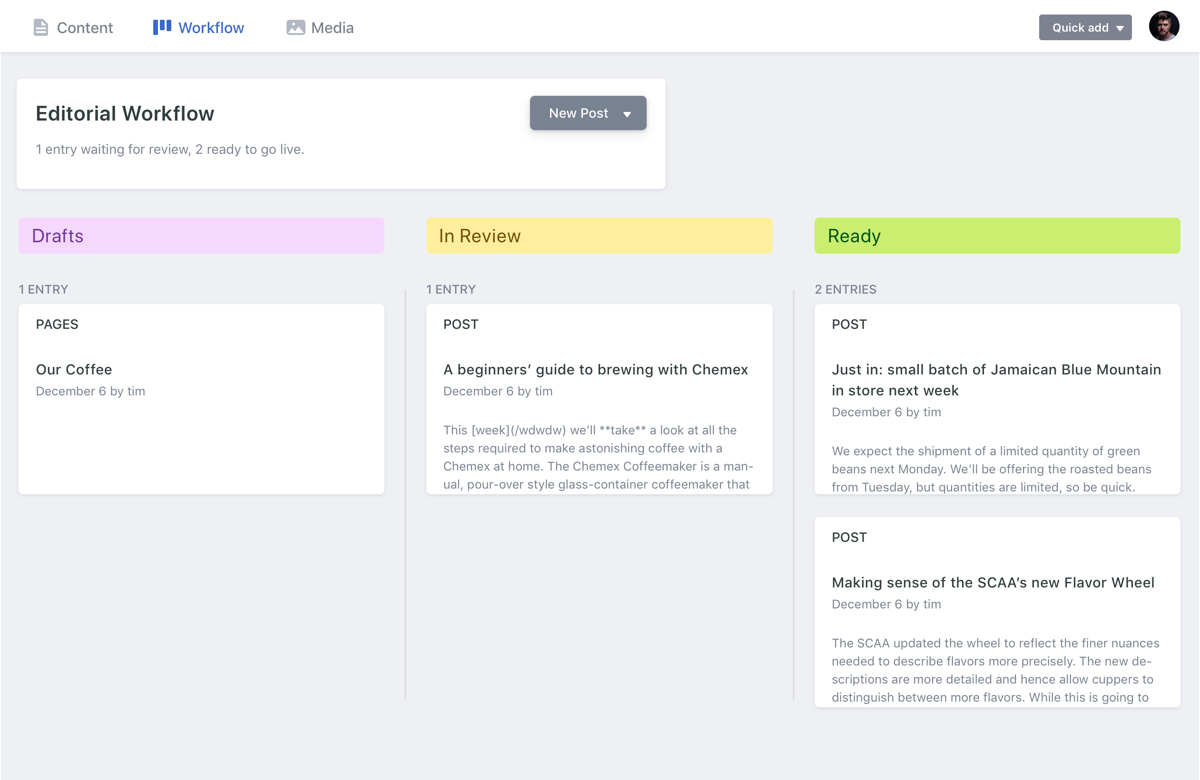
Content can move through clear statuses before publication, helping teams keep quality controls without adding a separate workflow tool.

Read docs

Editorial workflow view

Built-in media library plus external integrations

Decap CMS
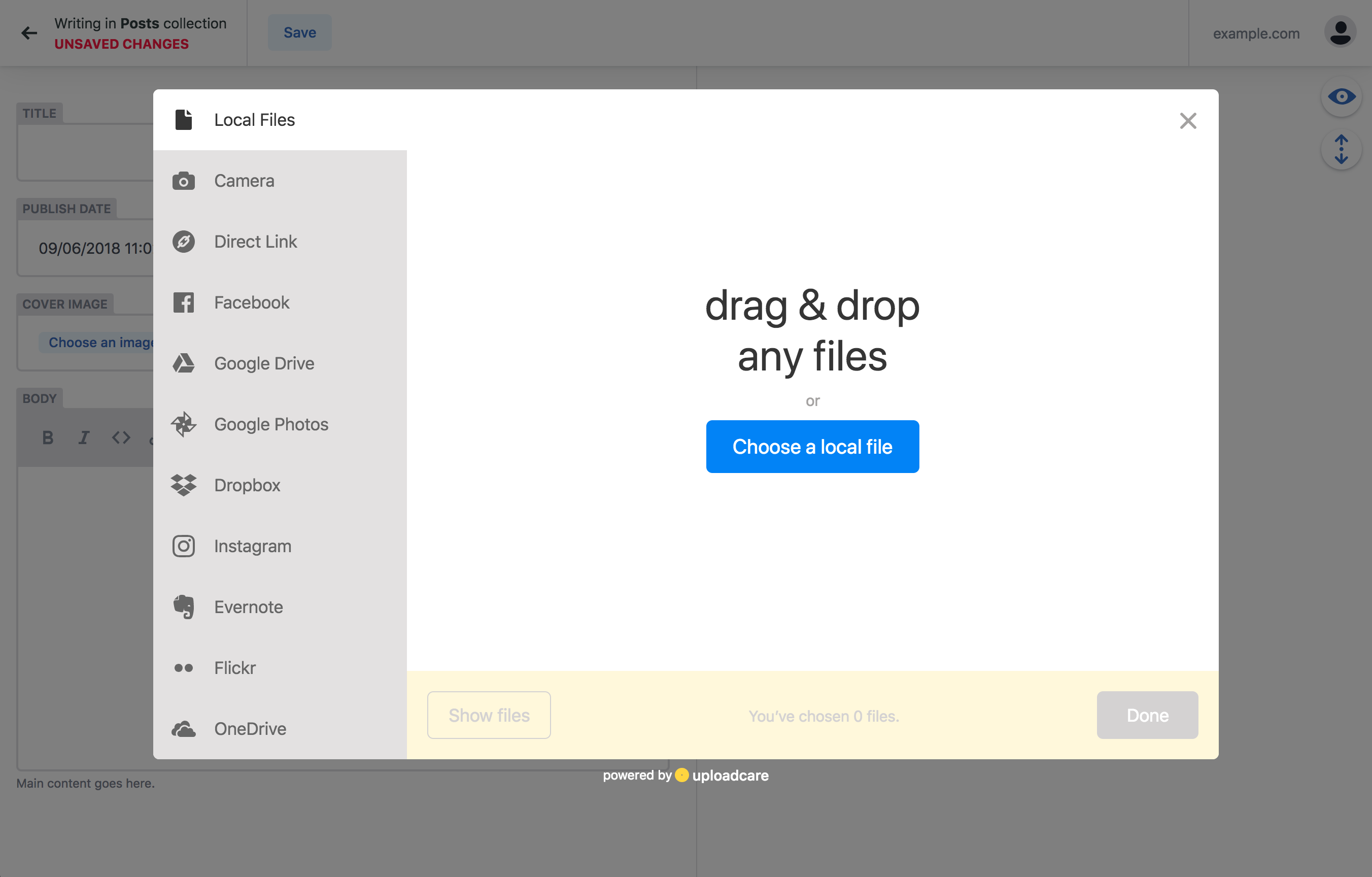
Editors can upload and manage assets directly in the CMS, and teams with advanced media needs can integrate tools like Cloudinary and Uploadcare, or develop their own integrations.

Read docs

Media integration example

Git-native history and ownership

Decap CMS
Content stays in your repository with full version history, branch workflows, and deployment checks in the same system your team already uses.
GitHub status checks and previews

Multiple backend integrations

Decap CMS
Connect to GitHub, GitLab, Gitea, Bitbucket, Azure, Git Gateway (Netlify), proxy, and test backends.

Read docs

Authentication and login

Decap CMS
Use backend-specific auth flows such as OAuth, implicit, and PKCE login.

Read docs

Flexible content modeling

Decap CMS
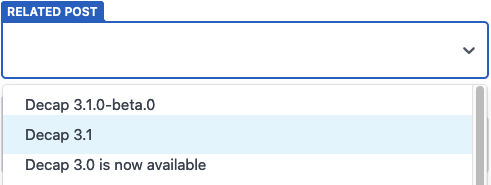
Define collections, nested structures, relation fields, and slug behavior so your content model matches your project rather than forcing a rigid schema.

Read docs

Relation widget example

Works with most static site stacks

Decap CMS
Decap is designed for Git-backed static and Jamstack architectures, including Hugo, Next.js, Gatsby, and Jekyll workflows.

Read docs

Supported frontend tools

Search across content

Decap CMS
Find entries using titles, slugs, nested fields, and configured summary fields.

Read docs

Localization and translations (i18n)

Decap CMS
Localize the UI and edit content in multiple locales with multiple options for the i18n content structure.

Read docs

Deploy previews

Decap CMS
Surface backend-generated preview URLs for entries before they are published.

Read docs

Slug generation and custom paths

Decap CMS
Generate unique slugs and support configurable file paths for entries.

Read docs

Folder and file collections

Decap CMS
Folder collections: Organize repeatable content in directory-based collections. File collections: model singleton pages and other fixed content files as editable entries.

Read docs

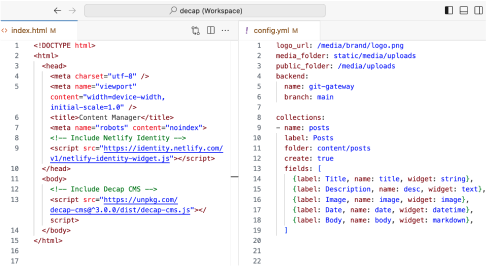
Simple configuration in a single YAML file

Decap CMS
Configure the entire CMS with one config.yml file. Decap’s declarative configuration makes it easy for developers to set up collections, fields, workflow rules, and media handling without code.
Read docs

Decap CMS YAML configuration file

Rich text / WYSIWYG editing

Decap CMS
Write structured rich text content with CMS-friendly editing controls. Switch between rich text and markdown editing modes.

Read docs

A wide selection of ready-made widgets and field controls

Decap CMS
Use built-in inputs for common content types like strings, text, numbers, booleans, dates, selects, and colors. Capture specialized data with code, map, and other structured widget controls. Attach images and files directly to entry fields and content blocks.

Read docs

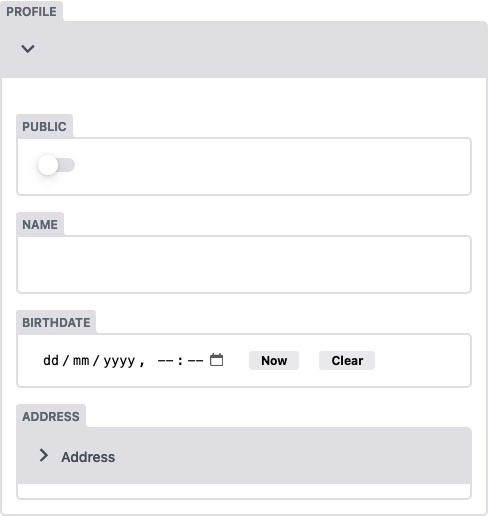
Nested objects and repeatable lists

Decap CMS
Build complex content with nested objects and repeatable list fields.

Read docs

Extensible with custom widgets and editor components

Decap CMS
Extend editorial UX with custom widgets (shortcodes), editor components, and plugins when default behavior is not enough for your product requirements.

Read docs

Structured widget customization

Instant preview templates and styles

Decap CMS
You can set up instant previews so editors can see in real-time how their changes will look on the frontend. You can write them in React and CSS.

Read docs

Local development with decap-server

Decap CMS
Use npx decap-server for local testing and rapid iteration on content models and editor behavior before pushing to remote environments.
Read docs

Local development setup concept

Editors sign in without a Git account

Decap Turbo All plans
Invite editors by email and they sign in with a Turbo account — no GitHub or GitLab account, OAuth app, auth server or Git Gateway to run. Admin URLs can include a wildcard, so the same login works on deploy previews and branch deploys.

Read docs

Team and site access

Decap Turbo All plans
Organizations have owners and members. Owners invite people by email, decide which sites each member can open, and remove access in one place. Every site has a built-in Full access role.

Read docs

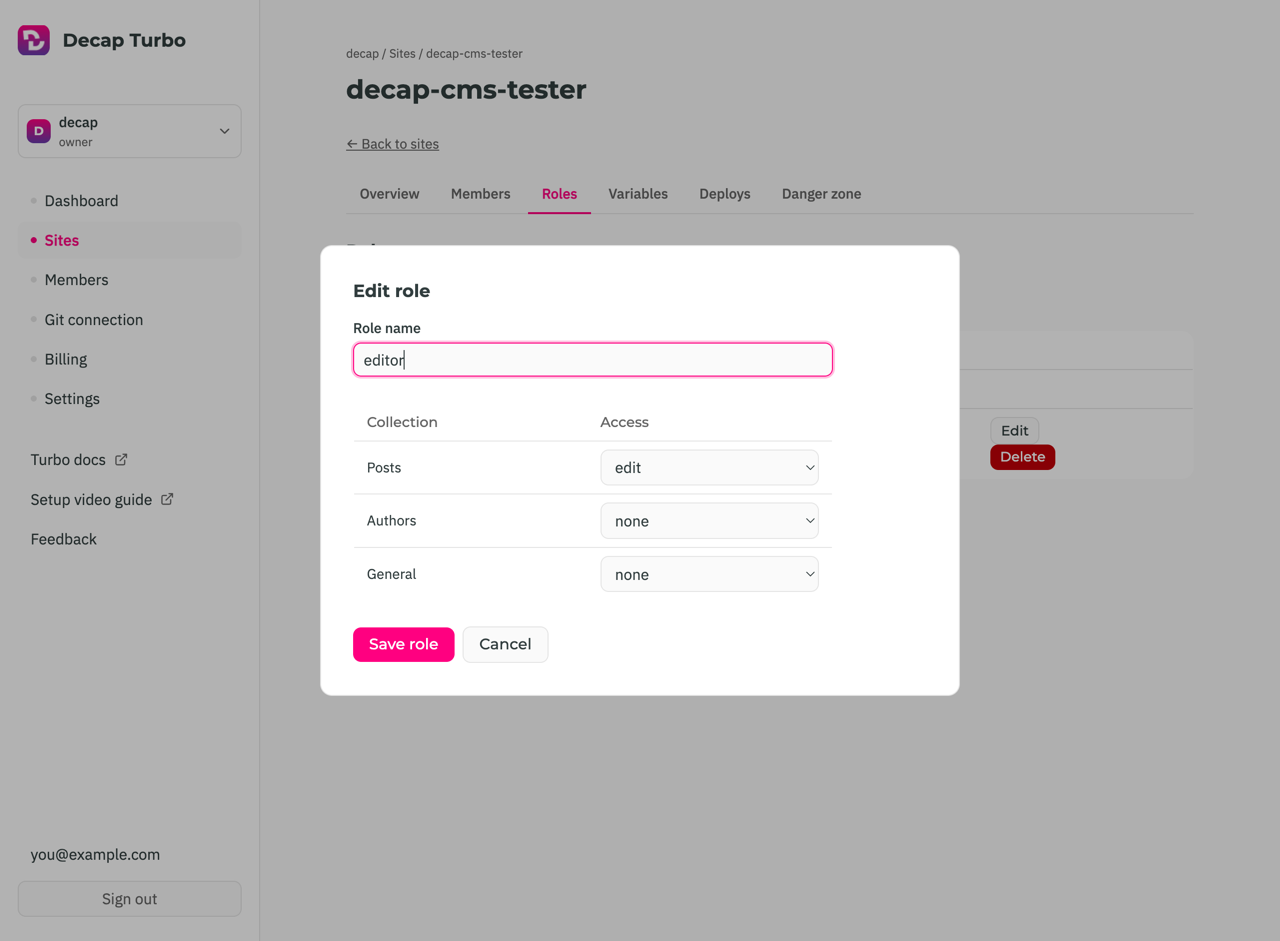
Custom per-collection roles

Decap Turbo Pro add-on
Create named roles for a site and decide, for each collection, whether someone can edit it, only view it, or not see it at all — or override access for a single member. Rules are enforced on the server, not just hidden in the interface.

Read docs

Editing a custom role with per-collection access

Performance database proxy for large content sets

Decap Turbo All plans
Large collections load from Turbo’s database instead of one Git API call per file, so they open quickly and don’t burn your Git host’s rate limits. Search runs on the server and covers entry bodies, not just titles.

Read docs

Know when your change is actually live

Decap Turbo All plans
Saving tells an editor the change was committed, not that the site has rebuilt. Decap watches the deploy and tells them when their change is live — wherever they are in the CMS — with a Deploys page showing what shipped, where it went, and why a build failed. Deploy previews of entries in the editorial workflow are listed too, so you can see whether an entry in review has a working preview. Available for GitHub-hosted sites today; GitLab support is on the roadmap.

Read docs

Site variables and secrets

Decap Turbo Pro and above
Each site gets a key/value store for the settings and credentials it needs, kept out of config.yml and out of your repository. Values marked secret are encrypted at rest and can be replaced, never read back. Today they hold the media library’s storage credentials.

Read docs

Activity log

Decap Turbo All plans
Owners see who saved which entry, in which collection, on which site, and when — along with invitations, new members and new sites — without digging through commit history.

Read docs

Works with GitHub and GitLab

Decap Turbo All plans
Use the turbo-github or turbo-gitlab backend. Connect your Git provider once per organization — the Decap Turbo GitHub App or a GitLab.com authorization — and limit it to selected repositories or projects. Content stays in your repository, and every save is still a commit.

Read docs

Media library in your own S3-compatible bucket

Decap Turbo Pro and above Beta
Editors upload and browse assets in your own bucket: AWS S3, Cloudflare R2, Bunny Storage, or any other S3-compatible storage. The CMS goes through Turbo, which holds the storage keys server-side, so they never reach the browser.

Read docs

Roadmap

Not built yet, and not available on any plan, including Enterprise. On the roadmap means we have decided to build it; Under consideration is an idea we have not committed to.

Command-line tool and MCP server for AI agents

Decap Turbo On the roadmap
A decap command-line tool for everything you do in the Turbo dashboard, such as creating sites and inviting members, with a built-in MCP server so AI agents like Claude, Cursor or Codex can do the same. Agents will also be able to fill in fields in the entry you have open in the CMS — you review the change and click Save.

Real-time editing visibility

Decap Turbo Under consideration
Show who else has an entry open, so distributed teams can avoid overwriting each other’s work.

SSO/SAML

Decap Turbo Under consideration
Let editors sign in through your organization’s own identity provider instead of an email and password.